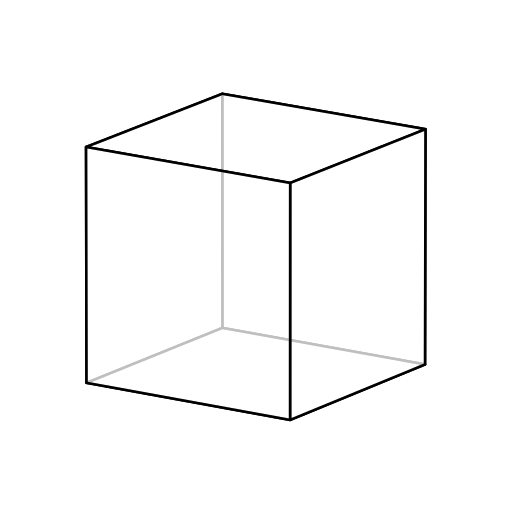
Usage Example
In addition to convenience methods, svg3d allows full control over the viewport, scene geometry, image style, and shaders. Methods are based on OpenGL standards and nomenclature where possible, and images can be created from any set of vertices and faces - even from ragged arrays! Simply pass an array of vertices and a list of arrays (one for vertex indices of each face, as below) to svg3d.Mesh.from_vertices_and_faces to render whatever geometry you like. Custom shader models can be implemented as a callable that takes a face index and a svg3d.Mesh object to shade.
import numpy as np
import svg3d

# Define the vertices and faces of a cube
vertices = np.array(
    [[-1., -1., -1.],
    [-1., -1.,  1.],
    [-1.,  1., -1.],
    [-1.,  1.,  1.],
    [ 1., -1., -1.],
    [ 1., -1.,  1.],
    [ 1.,  1., -1.],
    [ 1.,  1.,  1.]]
)

faces = [
    [0, 2, 6, 4],
    [0, 4, 5, 1],
    [4, 6, 7, 5],
    [0, 1, 3, 2],
    [2, 3, 7, 6],
    [1, 5, 7, 3]
]

# Set up our rendering style - transparent white gives a nice wireframe appearance
style = {
    "fill": "#FFFFFF",
    "fill_opacity": "0.75",
    "stroke": "black",
    "stroke_linejoin": "round",
    "stroke_width": "0.005",
}

# We use a shader callable to apply our desired style to each facet.
flat_shader = lambda face_index, mesh: style

pos_object = [0.0, 0.0, 0.0]  # "at" position
pos_camera = [40, 40, 120]  # "eye" position
vec_up = [0.0, 1.0, 0.0]  # "up" vector of camera. This is the default value.

z_near, z_far = 1.0, 200.0
aspect = 1.0  # Aspect ratio of the view cone
fov_y = 2.0  # Opening angle of the view cone. fov_x is equal to fov_y * aspect

look_at = svg3d.get_lookat_matrix(pos_object, pos_camera, vec_up=vec_up)
projection = svg3d.get_projection_matrix(
    z_near=z_near, z_far=z_far, fov_y=fov_y, aspect=aspect
)

# A "scene" is a list of Mesh objects, which can be easily generated from raw data
scene = [
    svg3d.Mesh.from_vertices_and_faces(vertices, faces, shader=flat_shader)
]

view = svg3d.View.from_look_at_and_projection(
    look_at=look_at,
    projection=projection,
    scene=scene,
)

svg3d.Engine([view]).render("cube-wireframe.svg")